
AI-generated campaign emails should earn their way into an export. A preview is not just a sample. It is the moment where the team checks whether personalization helped the message or made it messier.
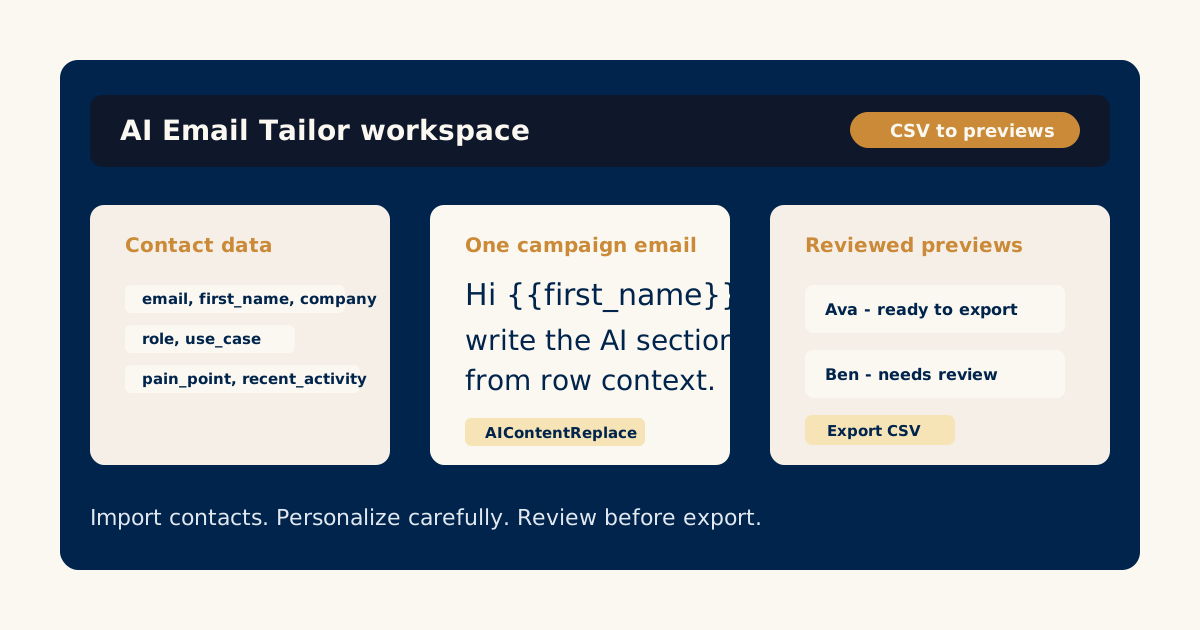
AI Email Tailor is designed around recipient previews and review states because personalized drafts need human judgment. A row can be valid, a template can be well written, and a generated email can still need a small edit.
The review step is where quality becomes visible.
Check the recipient context first
Start with the row data. What did the draft have available?
Look at the fields that matter:
- First name.
- Company.
- Role.
- Segment.
- Pain point.
- Use case.
- Recent activity.
- Any notes or custom fields.
If the data is thin, the email should be modest. If the data is specific, the email can be more specific. The draft should not sound more certain than the CSV deserves.
For setup context, start with creating personalized email campaigns from a CSV.
Look for over-personalization
Bad personalization calls attention to itself. It repeats the recipient’s name, overuses company details, or turns one small data point into a big assumption.
Watch for:
- The first name appearing too many times.
- Awkward company-name repetition.
- Claims about the recipient that are not in the row.
- A tone that feels too familiar for a cold or early-stage email.
- A dynamic paragraph that is longer than the rest of the message.
Good personalization should make the email feel easier to read, not more impressed with itself.
Check the join between fixed and dynamic copy
Most AI email issues happen at the edges. The dynamic section may sound fine alone but awkward beside the fixed campaign copy.
Read the sentence before the AI section, the AI section itself, and the sentence after it.
Ask:
- Does the transition feel natural?
- Does the AI section repeat something the fixed copy already says?
- Does the next sentence still make sense?
- Does the email have one clear point?
If the answer is no, the template may need a better instruction. The guide on writing AI email templates with dynamic sections explains how to tighten that source instruction.
Separate edits from template problems
Not every weak draft means the whole template is broken.
Use this rough rule:
- One or two awkward drafts: edit those recipient emails.
- Many drafts with the same issue: revise the template or AI instruction.
- Drafts using wrong fields: fix the CSV mapping or contact data.
- Drafts that are too long: make the AI section shorter and more constrained.
- Drafts that invent details: tell the AI section to use only row data.
Review is faster when you know whether you are fixing an individual draft or the system that produced it.
Mark what is ready
A campaign export should contain emails the team has actually approved. AI Email Tailor’s review flow supports marking recipient previews as ready or keeping them in review so the final export is not just “everything the model generated.”
Before marking ready, confirm:
- The subject line fits the body.
- The opening is natural.
- The personalization is accurate.
- The call to action is intact.
- The sender would be comfortable owning the message.
That last test matters. The sender’s name is on the email, so the sender’s judgment has to stay in the loop.
Export only after the review pass
Once the reviewed drafts are ready, export becomes useful. The final CSV can carry recipient details plus the generated subject and body fields for the next email platform, CRM sequence, or mail merge step.
The article on export-ready personalized emails covers how to think about that handoff.
Use the AI Email Tailor review workflow on a small campaign before scaling it to a full list.
Try the workflow
Start with one real campaign email.
Bring a contact CSV, write the core message once, and use AI Email Tailor's preview and review flow to decide what is ready to export.
Related AI Email Tailor guides
Keep improving the campaign workflow.
 Email Templates
How to Write an AI Email Template with Dynamic Sections
Learn how to write one campaign email with controlled AI-editable sections, stable copy, and useful contact-field context.
Read the guideCSV CampaignsHow to Create Personalized Email Campaigns from a CSV
A practical guide to turning CSV contact data into personalized campaign email drafts without treating every recipient the same.
Read the guideExport WorkflowHow to Export Personalized Emails for Campaign Tools
A practical guide to preparing reviewed AI-personalized emails for export into an email platform, CRM sequence, or mail merge workflow.
Read the guide