
A CSV is often where a real email campaign begins. It has the names, companies, roles, segments, pain points, use cases, or notes that make each recipient different. The hard part is turning those rows into emails that feel specific without writing every draft by hand.
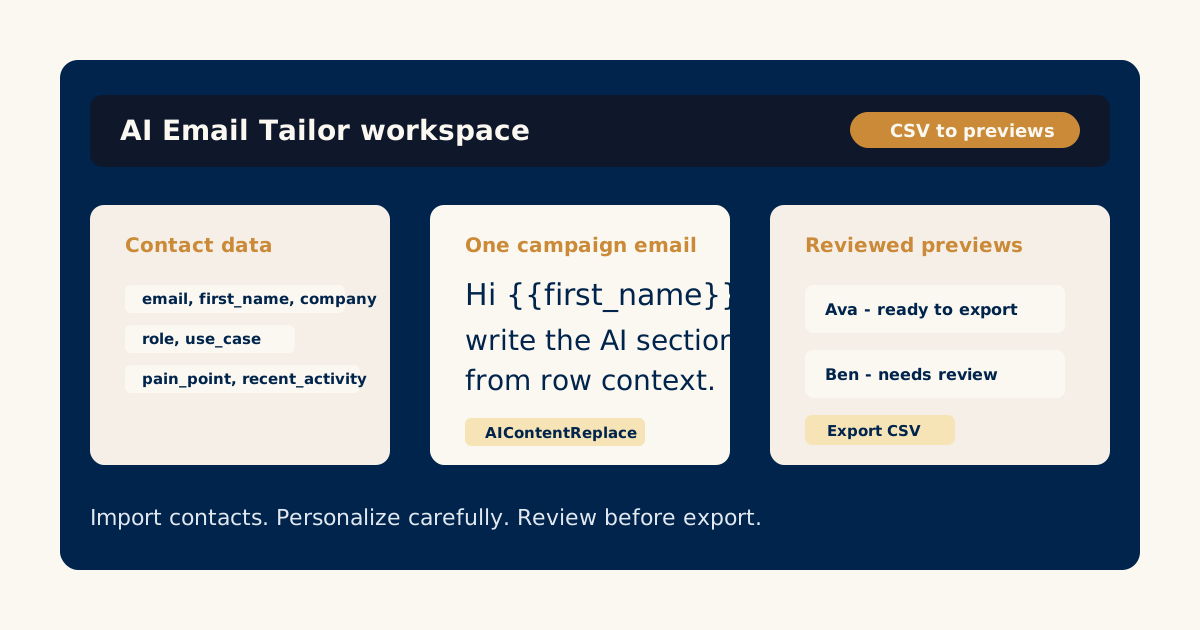
AI Email Tailor is built around that workflow. Bring contact data, write one campaign email, choose the parts AI can adapt, generate recipient previews, review them, and export the finished emails.
That is a better mental model than “send a mass email with first-name merge tags.” The goal is not to decorate the same message. The goal is to use the useful context you already have.
Start with the CSV you actually trust
The best personalization comes from columns that say something meaningful about the recipient. Email and first name are necessary, but they are rarely enough.
Useful columns might include:
- Company.
- Role or team.
- Industry.
- Segment.
- Recent activity.
- Pain point.
- Use case.
- Plan, tier, or account type.
- Region or market.
Before writing the email, scan the CSV and ask what the data can honestly support. If the only reliable columns are name and company, keep the personalization light. If you have a pain point, product interest, or recent action, you can write a more specific message.
The guide on writing AI email templates with dynamic sections shows how to turn those columns into a controlled email template.
Decide what should stay the same
Personalized does not mean every sentence should change. A campaign still needs one clear offer, one reason to care, and one next step.
Keep these parts stable:
- The core message.
- The offer or ask.
- The compliance-sensitive wording.
- Any required product or pricing language.
- The sender identity and signoff.
Then let AI help with the parts where recipient context matters: the opening line, the reason the email is relevant, the example you mention, or the transition into the call to action.
This keeps the campaign consistent while still making each draft feel written for the row.
Write for review, not instant sending
One of the healthiest habits in AI-assisted email is to treat generated drafts as previews first. AI Email Tailor has a preview-and-review flow because campaign teams need to inspect the actual recipient emails before exporting them.
When you generate previews, look for:
- Does the email use the right row data?
- Does it avoid repeating the recipient’s name awkwardly?
- Does the personalized sentence connect to the main message?
- Does anything sound too certain for the data you provided?
- Would you send this to a real customer or lead?
The article on reviewing AI-generated email previews goes deeper into what to check before a draft is marked ready.
Use export as a quality gate
Export should come after review, not before. AI Email Tailor is designed to help teams check recipient previews, mark drafts as ready or needing edits, and then export emails with the fields needed for the next campaign step.
That matters because your sending tool, CRM sequence, or mail merge process should receive finished drafts, not a pile of unreviewed AI output.
Think of the workflow in four moves:
- Import the contact CSV.
- Write the campaign email.
- Generate and review recipient previews.
- Export the ready emails.
That workflow keeps AI useful without removing human judgment.
Try it on one small campaign first
Do not start with a huge list. Choose a small CSV with clear context fields and a campaign where you already know the message.
Write one email. Let AI personalize one controlled section. Review the first batch. Edit the weak drafts. Export only what is ready.
Read the AI Email Tailor guides before building the full campaign workflow.
Try the workflow
Start with one real campaign email.
Bring a contact CSV, write the core message once, and use AI Email Tailor's preview and review flow to decide what is ready to export.
Related AI Email Tailor guides
Keep improving the campaign workflow.
 Email Templates
How to Write an AI Email Template with Dynamic Sections
Learn how to write one campaign email with controlled AI-editable sections, stable copy, and useful contact-field context.
Read the guideReview WorkflowHow to Review AI-Generated Email Previews Before Export
A review checklist for AI-generated recipient emails: check context, tone, accuracy, repetition, and export readiness.
Read the guideExport WorkflowHow to Export Personalized Emails for Campaign Tools
A practical guide to preparing reviewed AI-personalized emails for export into an email platform, CRM sequence, or mail merge workflow.
Read the guide